Barbershop Waitlist

Fill last-minute openings automatically. Let clients join a waiting list and get notified when a matching appointment slot becomes available due to cancellations or schedule changes.

How it works

From waitlist to confirmed appointment

1

Join the waitlist

If no suitable appointment time is available, clients can add themselves to the barbershop’s mobile app or booking website.

2

Automatic availability monitoring

Barberly continuously monitors cancellations, rescheduled appointments, and newly opened time slots. When a matching time becomes available, the client receives a notification.

3

Book the appointment

After receiving the notification, the client can immediately return to the booking page and reserve the newly available appointment slot before it gets taken.

Clients join the waitlist when no time slots are available

When a client cannot find a suitable appointment time, they can add themselves to the waitlist directly from your custom mobile app or booking website. Barberly will automatically monitor the schedule and notify them as soon as a matching slot becomes available.
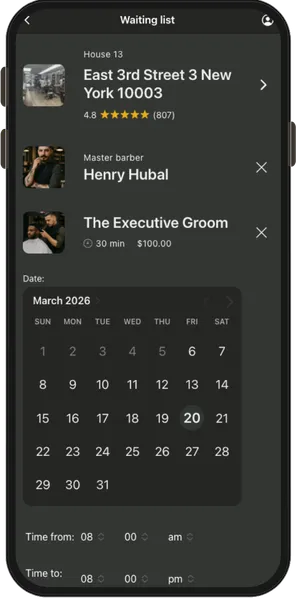
Barbershop waitlist on mobile app
  • Join the waitlist from the mobile app
  • Join the waitlist from the booking website
  • Staff can add clients manually
  • Specify preferred barber and service
  • Receive notifications when a slot opens
Barbershop waitlist on mobile app

Automatic cancellation monitoring

Barberly continuously monitors cancellations, rescheduled appointments, and other changes in the schedule. When a matching time becomes available, the client receives a notification and can quickly convert their waitlist entry into a confirmed appointment without going through the full booking process again.

Frequently asked questions

What is the waitlist for appointments?

The waitlist allows clients to request an appointment even when the schedule is fully booked. Instead of calling the shop or checking the booking page again and again, clients can leave their request and Barberly will notify them if a suitable time becomes available.

Is this the same as the walk-in queue?

No. The waitlist is for clients who want to book an appointment if a slot becomes available later. The walk-in queue is for clients who are already in the barbershop waiting to be served without an appointment.

How do clients join the waitlist?

Clients can join the waitlist directly from the barbershop’s mobile app or booking website when they cannot find a suitable appointment time. Staff can also add clients to the waitlist manually if a client calls the shop or asks to be notified about cancellations.

How does Barberly find available times?

The system automatically monitors cancellations, rescheduled appointments, and any new availability in the schedule. When a time slot appears that matches a waitlist request, Barberly immediately sends a notification to the client.

How are clients notified?

Clients can receive notifications through push notifications in the mobile app, SMS, WhatsApp, or email depending on the notification settings configured by the barbershop.

What happens after a client receives the notification?

When a client receives a notification about an available time, they can quickly convert their waitlist entry into a confirmed appointment without going through the full booking process again.

Can the barbershop manage the waitlist?

Yes. The barbershop can view all waitlist requests, add clients manually, and monitor when notifications are sent. This helps staff keep track of clients waiting for earlier availability and fill canceled slots faster.

Can Barberly notify clients more than once?

Yes. The barbershop can configure how many times Barberly should notify clients about a newly available time in case the first notification is missed.

Explore Barberly by features

It's free to try. We hope you do

Access all Barberly features completely free for 30 days.
Start Free Trial
No credit card required