Appointment Board for TV screen

Turn any TV into a real-time appointment and queue board for your barbershop. Display upcoming appointments, walk-in clients, and kiosk check-ins in one clean timeline visible to staff and customers.

Turn any TV into a real-time appointment and queue board

The Appointment Board displays everyone coming into the shop — walk-ins, online bookings, and clients who check in through your self-check-in kiosk — all in one clean timeline. Designed for barbershops, it helps reduce confusion, improve flow, and create a more professional in-shop experience
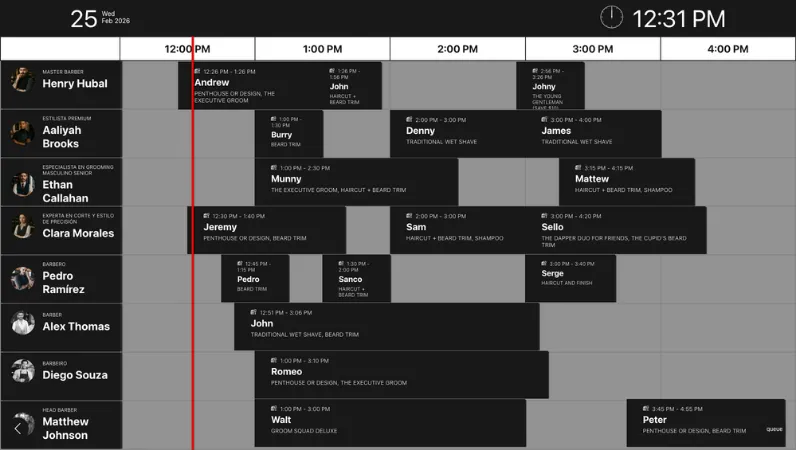
Barbershop appointment board on TV screen

What it shows

  • Live schedule with upcoming appointments
  • Electronic queue for walk-ins
  • Clients checked in via self check-in kiosk
  • Bookings made online or added by staff
  • Clear timeline view for the current working hours

Frequently asked questions

What does the Appointment Board show?

The Appointment Board displays a real-time overview of your barbershop activity, including upcoming appointments, walk-in clients waiting in the electronic queue, customers who checked in through the self check-in kiosk, and bookings made online or added by staff, all organized in a clear timeline for the current working hours.

Is the Appointment Board updated in real time?

Yes. The board updates automatically as new bookings are created, clients check in, walk-ins join the queue, or appointments are modified by staff, ensuring the screen always shows the current situation in the shop.

Can I customize how the board looks on the TV screen?

Yes. The Appointment Board supports design customization so you can adjust how information is displayed, including timeline length, spacing, and layout, allowing the screen to fit different TV sizes and barbershop setups.

What if my barbershop has only a few barbers?

If your shop has only two, three, or four barbers, you can increase the height of the rows so the schedule fills the screen better and remains easy to read from a distance.

How many hours can the board display?

The visible time range is customizable, so you can display more or fewer hours depending on your needs, allowing you to focus only on the current part of the day or show a longer upcoming schedule.

Can clients see the walk-in queue on the screen?

Yes. The board can display the electronic queue for walk-ins so clients in the shop can easily see their position and understand when they are likely to be served.

Does the Appointment Board work with the self check-in kiosk?

Yes. When clients check in through the self check-in kiosk, they immediately appear on the Appointment Board, making it easy for staff and customers to see the current queue and upcoming appointments.

How do I connect the Appointment Board to a TV?

The Appointment Board runs in a web browser, so you can open it on a smart TV, a TV connected to a computer, or a TV box. Detailed instructions are available here: https://help.barberly.com/en/articles/3599990-how-connect-electronic-queue-with-big-tv-screen.

Explore Barberly by features

It's free to try. We hope you do

Access all Barberly features completely free for 30 days.
Start Free Trial
No credit card required